While at EPAM and working on the Google account, I built an AI-assisted workflow that leveraged Gemini and NotebookLM against more than 30 tool-specific help centers.
Problem
New or updated content was taking two weeks minimum. Much of that time was taken up with initial drafting and QA reviews. With the volume of work we had, this was not sustainable with just seven writers.
Audience
Members of Google’s commercial real estate division. They had dozens of tools and reporting products and each one had its own distinct help center. Those ranged in size from 30 to more than 250 articles.
My role
I was the most familiar with AI tools and their emerging capabilities, so I took the lead on parallel projects to cut drafting time and reduce QA defects using Gemini and NotebookLM.
Tools
Google Gemini, NotebookLM, Smartsheets, Google’s internal XML authoring tool
Constraints
For security reasons, Gemini and NotebookLM couldn’t reach the live help centers. Since Gemini and NotebookLM were the only client-approved AI tools, I had to work within this walled garden.
Outcome
- Cut project scoping time
- Reduced peer review time
- Improved product quality
- Sped up new writer onboarding
What I did
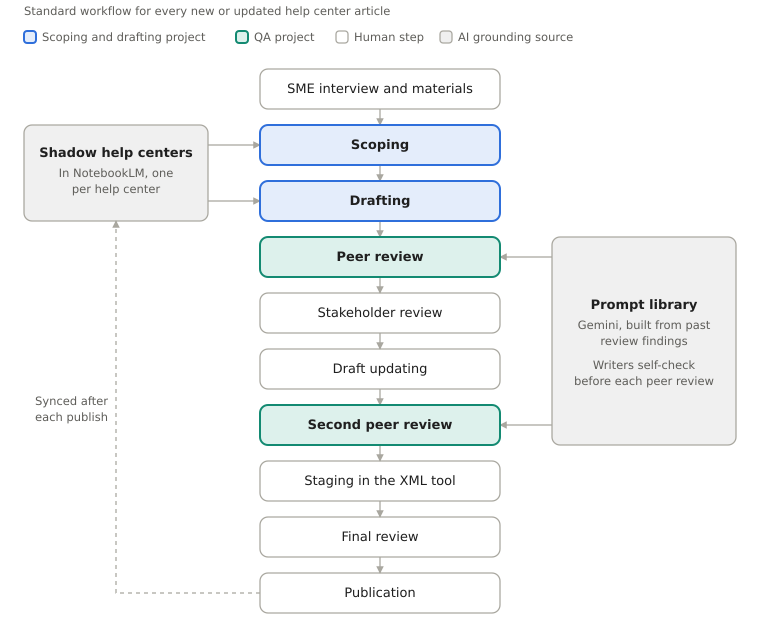
Our team followed a standard 10-step workflow for every new or updated article, from initial SME engagement through final publication. Most of the time went to two places: scoping and drafting at the start, and peer review during the process. I led two parallel projects, both aimed at leveraging AI to improve these areas.
Project 1: Scoping and drafting
This project focused on improving the intake of information from SMEs and using that to scope the work needed for updating existing content. The goal was to collect information about a new or changing feature from the SME, give it to Gemini to produce an initial draft and ask NotebookLM to identify any existing articles in any given help center that would require updates based on the new or updated feature.
Building shadow copies of the help centers
Security policies didn’t allow for Gemini and NotebookLM to access the internal help centers we were charged with maintaining. To address this, we developed shadow copies of each help center as individual NotebookLM instances. While duplicating content wasn’t ideal, it was the only way to give the AI access to the content. After getting approval to maintain these within a sandbox, the team spent a few weeks migrating content.
Using the notebooks to scope changes
After the SME interview, writers gave NotebookLM their notes and asked it to identify every article the change would affect. That told us whether an update was one new article or a dozen revisions. Large updates involving multiple articles were usually split up across two or three writers.
Drafting with Gemini
Using materials we’d collected from a SME during an interview, such as PRDs, Figma diagrams, video walk-throughs, and meeting transcripts, a writer would then collaborate with Gemini to create an initial draft. If this was a new article, Gemini would craft the draft from scratch using some existing articles as examples of the style, format, and voice. For existing articles, Gemini was instructed to follow the existing content.
Adding a sync step after publication
To prevent the shadow copies from drifting, I added a step to our workflow so that every time we published a new or updated article, the writer updated the matching notebook.
Project 2: QA prompt library
This project was focused on improving our content quality and reducing the amount of time we spent reviewing and revising drafts. In this project I led a team with three other writers to develop an initial prompt library that writers would use when reviewing drafts.
Started from our review data
Instead of writing prompts against the whole style guide, we analyzed past draft review findings and targeted the error types that came up most often: style guide deviations, use of passive voice, and language that wasn’t suitable for translation and internationalization. Each of these required detailed prompts to clearly communicate the errors we were looking for to the AI.
Split the work by error type.
Each of us took a category, such as passive voice or reading level, and wrote prompts to catch it. We tested each other’s prompts until the group agreed each one worked. We wrote each prompt to return the specific error it flagged, why it was flagged, and a suggested fix. This helped the writer find and fix the error, but also left them in control to be sure the text read as human and not machine generated. It also helped the writers learn from the explanation, resulting in few initial instances of those errors over time.
Opening the library to the whole team
Once we had published our initial library, every writer on the team could add and improve prompts. The library grew as we found better approaches and as Gemini’s abilities improved.
Built the checks into both peer reviews.
Writers ran their drafts through the library using the Gemini sidebar in Google Docs before each peer review. This ensured that any edits based on stakeholder feedback didn’t introduce new errors.
Both projects were folded into the team’s standard workflow template, so every writer used them on every update.
Results
Estimated time per task, before and after:
- Scoping: from 1 full day to under 1 hour per update (90% faster)
- Drafting: from 1 to 3 days to half a day per update (75% faster)
- Peer review: from 4 hours to under 1 hour per article (75% reduction)
- Draft updating: from 4 hours to under 1 hour per article (75% reduction)
- Final review: from 2 hours to under 1 hour per article (50% reduction)
Scoping became more reliable. NotebookLM found every affected article, so updates were sized correctly before work was assigned. Fewer defects reached QA, and voice and style guide adherence became more consistent across all 30+ help centers.
The shadow help centers also sped up onboarding. A new writer used to need about a month to learn what all of our supported tools did. With the notebooks, they could get a summary of any tool and ask follow-up questions on their own.
For the team, the biggest change was where time went. Writers spent less of it searching, drafting from scratch, and fixing mechanical errors, and more of it on technical accuracy and usability.